
Your Camp Website Is Doing More Work Than You Think
Right now, while you're reading this, a family three states away is sitting on a couch with a phone, typing your camp's name into Google. They've heard about you from a neighbor, a youth pastor, or a Facebook post. They're curious. They're ready to learn more.
Your website has about five seconds to convince them this is worth more than five seconds.
That's the part most camps underestimate. Every dollar spent on flyers, signs, mailers, and social ads ends in one place: your website. It's the front door, the brochure, and the closer all at once. And if it's slow, confusing, or doesn't answer the questions on a parent's mind, that traffic doesn't convert. It just leaves.
Summer is the busiest window for this. Families are actively shopping for camps. Group leaders are finalizing fall retreat venues. Donors are looking up your story before they give. The site that handles all three audiences gracefully wins. The site that makes any of them work too hard quietly loses bookings every single day.
The good news? You don't need a rebuild to fix most of this. You need a thirty-minute audit, a clear-eyed look at the front door, and the discipline to fix what you find. That's exactly what this post is for.
Below, we walk through ten of the most important questions every camp and retreat center website should be able to answer in seconds. Each one comes with what to look for and what to do about it. Run the audit on your own site as you read, and you'll know within the hour whether your website is pulling its weight, or quietly working against you.
Why Camp Websites Convert or Don't
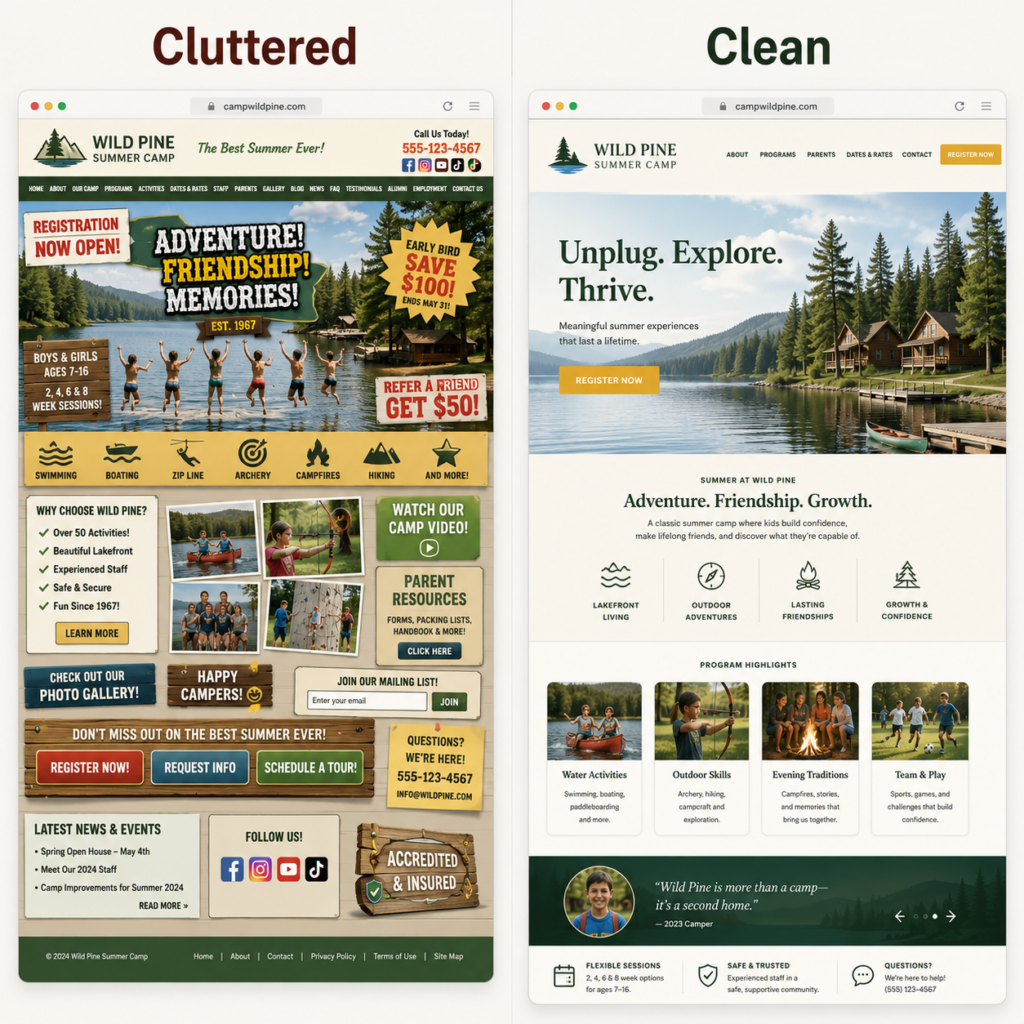
Before we get into the audit, here's the framing that matters most. A great camp website doesn't have to be flashy. It has to be clear, fast, and trustworthy. Those three things, in that order.
Clear means a parent can answer "is this the right camp for my kid?" without scrolling through three pages of mission statement. Fast means the site loads before they get distracted. Trustworthy means they see real photos, real names, and real people, not stock imagery that could be any camp anywhere.
When all three are working, registration feels like the obvious next step. When even one is broken, hesitation creeps in. And hesitation is the silent killer of camp registrations. People rarely come back later to register from a site that gave them a hard time the first visit. They just go somewhere easier.
These are the underlying summer camp website best practices that show up in every audit category below. Keep them in mind as you go through the checklist. If you find yourself defending a design choice that fails one of those three tests, that's the thing to fix first.
The 10-Point Camp Website Audit
Grab your phone and your laptop. Pull up your camp website on both. Open this checklist alongside it. Go through each point, and rate yourself honestly: pass, needs work, or fail.
1. Does Your Homepage Answer "Is This the Right Camp for Us?" in Five Seconds?
What to check: Look at your homepage hero (the section visible before any scrolling). Within five seconds, can a first-time visitor tell what kind of camp you are, who you serve, where you are, and what you do differently?
The fix: Replace vague taglines like "Adventure Awaits" or "Where Memories Are Made" with a specific, plain-language headline. Try a structure like: "A [type of camp] for [audience] in [location]." A line like "A Christian summer camp for kids ages 7–14 in the Pennsylvania mountains" beats anything poetic, every time. Poetic doesn't convert. Specific does.
2. Is Your Primary Call to Action Visible Without Scrolling?
What to check: On the homepage, can you see a clear button that says some version of "Register" or "See Available Dates" or "Book a Tour" without scrolling at all? On both desktop and mobile?
The fix: Add one primary call-to-action button to your homepage hero, in a contrasting color, that goes straight to your most important conversion page. For most summer camps, that's the registration page. For retreat centers, it's the group booking inquiry form. One button. Above the fold. Impossible to miss.
3. Can a Parent Get to Your Registration Page in Two Clicks?
What to check: From your homepage, count the clicks it takes to reach your registration or booking page. If it's more than two, you have a navigation problem.
The fix: Add "Register" (or "Book Now," for retreat centers) directly to your top navigation, in addition to your hero button. Make it visually distinct from the rest of the menu. Bold, colored, or in a button shape. This is the single most important page on your site. Treat it that way.
4. Does Your Site Load in Under Three Seconds?
What to check: Open your homepage on your phone, with mobile data, not wifi. Time how long it takes to load. This tells you what a parent actually experiences.
The fix: If the site is slow, the usual culprits are oversized images, too many third-party plugins, or outdated hosting. Start by compressing your photos (most can be cut to one-third their size with no visible quality loss), remove plugins you don't actually use, and ask your developer about a faster hosting plan. Speed is one of the most underrated summer camp website best practices, because it costs you visitors before they even see your content.
5. Does It Actually Work on a Phone?
What to check: Over half of camp website traffic comes from mobile. Pull up your site on your phone and try to complete a registration. Can you read the text without pinching? Are buttons big enough to tap? Does the form behave?
The fix: Any element that breaks on mobile gets fixed first. Phone-first design isn't optional anymore. If your developer can't make the registration flow clean on a phone, that's a non-negotiable hire-someone-else moment. Parents will not switch to a desktop to register their kid for camp.
Halfway There: Get Your Live Scores in Seconds
Halfway through the checklist and feeling like this is more time than you've got? Drop your name, email, and camp website into our free audit tool and we'll run a real-time scan on your site, both mobile and desktop. You'll see Performance, Accessibility, SEO, and Best Practices scores in seconds, right on the page.
Then come back for the rest of the checklist below. The next five points cover content, social proof, contact, and forms, the trust layer of every great camp website.
Get Your Free Website Score
Enter your camp website below to instantly see how it scores.
📱 Mobile Results
💻 Desktop Results
6. Are Your Dates, Prices, and Ages Findable in Ten Seconds?
What to check: From your homepage, can a parent find session dates, pricing, and age ranges within ten seconds? Without clicking through three pages? Without filling out a form just to learn the cost?
The fix: Put dates and pricing on a single, well-organized page, linked clearly from the main navigation. Hiding prices behind a "contact us for a quote" form makes sense for retreat bookings, but for summer camp registration, it's a conversion killer. Parents comparing camps will skip yours and go to the one that respects their time.
7. Do You Sound Like Your Camp, or Like Generic Agency Copy?
What to check: Read your homepage and About page out loud. Does it sound like a real person from your camp talking to a real parent? Or does it sound like it could be any camp anywhere? Watch for phrases like "world-class facilities," "transformative experiences," and "premier destination." Those are red flags.
The fix: Rewrite key pages in plain, specific language. Use real stories. Name specific traditions. Say "our staff are college students who pass three rounds of interviews and a background check" instead of "highly qualified staff." Specificity builds trust. Generic copy creates doubt.
8. Is There Social Proof Above the Fold?
What to check: On your homepage, before any scrolling, is there at least one piece of social proof? A quote, a review snippet, a logo of a partner organization, or a stat ("Trusted by 4,000+ families since 1962")?
The fix: Add a short, specific testimonial to the upper portion of your homepage. Real quote, real first name, real photo if you have permission. For retreat centers, a logo bar of organizations you've hosted (churches, schools, nonprofits) works beautifully. The goal is the moment a visitor thinks "okay, other people trust this place, I can too." That moment needs to happen fast.
9. Can Families Reach You Without Picking Up the Phone?
What to check: Look at your Contact page. Is there a working contact form? Is your email address easy to find? Is there a clear answer for "who do I talk to if I have a question about registration vs. pricing vs. groups"?
The fix: Build a simple inquiry form on your Contact page with a dropdown for "what are you asking about?" so the right person gets the right question. Add an email address that you actually monitor (not a generic info@ inbox no one checks). For retreat centers, separating group bookings from general questions is non-negotiable. Many parents and group leaders will not call. Make it easy for them not to have to.
10. Does Your Registration Form Respect Their Time?
What to check: Walk through your registration form yourself, on a phone, as if you were a parent registering your kid for the first time. How many fields are required? How long does it take? How many times do you have to scroll, retype, or guess what the form wants?
The fix: Cut your registration form to the absolute minimum required to start a registration. Collect medical history, dietary restrictions, and emergency contacts in a follow-up form after the spot is reserved, not in the first transaction. Every extra field on the first form costs you completions. The cleanest summer camp registration flows ask for the essentials, take the payment or deposit, and follow up later for everything else.
What to Do With What You Found
If you went through this audit honestly, you probably caught a handful of things that need work. That's normal. Even camps with strong websites usually have two or three friction points hiding in plain sight. The goal isn't a perfect website. The goal is to find the fixes that actually move registrations and make them.
Here's a simple way to prioritize what you fixed:
- Anything in the top three points (clarity, primary CTA, navigation) gets fixed first. These shape every visitor's first thirty seconds.
- Mobile and speed (points 4 and 5) come next. They quietly cut your traffic in half if they're broken.
- Content, social proof, and contact (points 6 through 9) are the trust layer. Once the basics work, these turn curious visitors into confident ones.
- The registration form (point 10) is last for a reason. It only matters once everything before it works. But when the rest is solid, this is where the biggest wins are hiding.
Don't try to fix everything in a weekend. Pick the top three. Knock them out. Re-audit in a month and tackle the next three. That's how website conversion improves, one focused round at a time.
Run a FREE Audit on Your Camp Website
If you want to see exactly how your camp website scores before you tackle the fixes, drop your name, email, and camp website into our free audit tool. We'll run a live scan on your site, both mobile and desktop, and show you Performance, Accessibility, SEO, and Best Practices scores in real time, right on the page.
Here's how it works:
- Enter your name, email, and camp website on the audit page.
- Within seconds, you'll see your live mobile and desktop scores across all four categories.
No sales call required to get your results. If you decide you want help fixing what we find, that's a separate conversation.
Get Your Free Website Score
Enter your camp website below to instantly see how it scores.
📱 Mobile Results
💻 Desktop Results
Or Skip Ahead and Talk to Us Directly
If you've already audited your site, know what's broken, and just want to talk through fixes, camp website strategy, design, and conversion is one of the core services we offer at Tic Tac Toe Marketing for Camps. We've helped camps and retreat centers rework their sites into actual registration engines.
We'll walk through your site with you, point out the friction, and tell you whether the fix is a tune-up or a rebuild. No pressure, no fluff.
Tic Tac Toe Marketing for Camps is a specialized marketing agency for summer camps and retreat centers.
We provide strategy, messaging, websites, email, social media, and print marketing built around the unique needs of camp and retreat center organizations.